Introduction
Creating a poll on your website enables you to find out more about the interests of the user. I recently added a weekly poll system to KofeeKoder. In this article, I will explain how to create an AJAX enabled polling system using ASP.NET client callbacks.
Database Schema
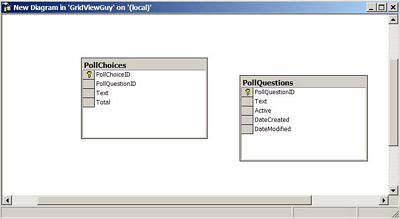
The database schema consists of only two tables:
PollQuestions: This table holds all the questions for the pollPollChoices: This table holds the choices of the poll questions
Take a look at the schema shown below:
Stored Procedure
CREATE PROCEDURE usp_GetLastestPoll

AS

DECLARE @pqID int
SELECT @pqID = MAX(PollQuestionID) FROM PollQuestions
PRINT @pqID

SELECT q.PollQuestionID,q.[Text] AS PollText,c.PollChoiceID,
  c.[Text] ChoiceText,c.Total FROM PollQuestions q JOIN PollChoices c
  ON q.PollQuestionID = c.PollQuestionID WHERE q.PollQuestionID = @pqID

GO
Poll Control Architecture
I wanted to create the polling user control in such a way that it does not depend on the page. Let's take a look at the class diagram below:
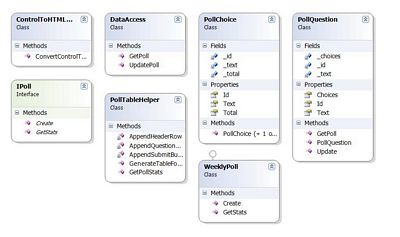
Now, let me explain each class in detail:
IPoll<code>: IPoll is an interface which will be used by all the polling classes WeeklyPoll: This is the class responsible for creating weekly polls. It implements the IPoll interface PollQuestion: This is an entity class which maps to the PollQuestions table in the database PollChoice: This is an entity class which maps to the PollChoices table in the database PollTableHelper: This is a helper class which is used to generate dynamic HTML tablesControlToHtmlConvertor: This class contains helper methods to convert a control into pure HTMLDataAccess: This class serves as the DataAccess class and is used to INSERT and SELECT polls from the database
Implementation
Let's dive into the implementation details. We will see few important classes in this article. For complete implementation, you can use the code given below in this article.
IPollInterface
The IPollInterface is implemented by all classes that want to expose polling functionality.
public interface IPoll
    {
        string Create();
        string GetStats();
    }
WeeklyPoll
WeeklyPoll is one of the classes that implements the IPoll interface. The implementation is given below:
public class WeeklyPoll : IPoll
    {
        public string Create()
        {
            PollQuestion poll = PollQuestion.GetPoll();
            return PollTableHelper.GenerateTableForPoll(poll);
        }

        public string GetStats()
        {
            PollQuestion poll = PollQuestion.GetPoll();
            return PollTableHelper.GetPollStats(poll);
        }
    }
I will not discuss the PollTableHelper class since the code is simply used to build a table. You can download the complete code available for download at the top of this article and view the implementation.
PollControl.ascx
The PollControl.ascx is a user control which is used to display the poll to the user. Let's first take a look at the HTML code for the PollControl.ascx control.
Yup, that's it!
Now, let's take a look at the code behind:
protected void Page_Load(object sender, EventArgs e)
{
RegisterCallbacks();
}
private void RegisterCallbacks()
{
string sbReference = Page.ClientScript.GetCallbackEventReference
(this, "arg", "ReceiveServerData", "context");
string cbScript = String.Empty;
if (!Page.ClientScript.IsClientScriptBlockRegistered("CallServer"))
{
cbScript = @" function CallServer(arg,context)
{ " + sbReference + "} window.setTimeout(CallServer,100); ";
Page.ClientScript.RegisterClientScriptBlock
(this.GetType(), "CallServer", cbScript, true);
}
}
In the code above I am simply registering the callbacks. If you are interested in learning more about how to register the page/usercontrol to use callbacks, then take a look at this article.
Everything about registering the callback method is the same except the call to the window.setTimeout function. I made this call so I can fire the CallServer method right after registering it on the page. I know you must be thinking why not simply fire CallServer('', '') at the end of the callback registration process. Unfortunately, this technique does not work since the CallServer takes arguments from the page.
For the callbacks to work, you must implement the ICallbackEventHandler interface as shown below:
public partial class PollControl :
    System.Web.UI.UserControl, ICallbackEventHandler
The ICallbackEventHandler interface consists of two methods namely, GetCallbackResult and RaiseCallbackEvent. Let's see the implementation below:
public void RaiseCallbackEvent(string eventArgument)
{
string[] selection = eventArgument.Split(':');
if (selection.Length > 1)
{
PollQuestion.Update(Int32.Parse(selection[0]),
Int32.Parse(selection[1]));
CreatePollCookie();
}
}
The RaiseCallbackEvent is fired when the user casts the vote using the "Vote" button. I check if the user has selected some choice and if so, update the choice in the database. After updating the choice I also create a cookie so that the user will not be able to vote for some time.
I could have also used IP address to keep track of which user has given a vote but using IP address has some disadvantages. If a person is on a LAN which is behind a firewall then the vote given by him will be the vote for the entire LAN since computers connected to the LAN are behind a firewall giving them the same IP address.
The CreatePollCookie is used to create HttpCookie:
private void CreatePollCookie()
    {
        HttpCookie pollCookie = new HttpCookie("PollCookie");
        pollCookie.Value = "PollCookie";

      pollCookie.Expires = DateTime.Now.AddDays(7);
        Response.Cookies.Add(pollCookie);
    }
The method GetCallbackResult is fired right before sending the contents to the client.
public string GetCallbackResult()
        {
            string result = String.Empty;
            IPoll poll = new WeeklyPoll();

            if (DoesCookieExists())
            {
                result = poll.GetStats();
            }
            else
            {
                result = poll.Create();
            }

            return result;
        }
The method DoesCookieExists ensures that if the client has already voted, then you need to show her or him the vote statistics, otherwise show the poll. This is performed by checking for the existence of the cookie.
private bool DoesCookieExists()
      {
          if (Request.Cookies["PollCookie"] != null) return true;
          else return false;
      }
The JavaScript Code
All the JavaScript code is stored in the Site.js file. All the pages of the website must have a reference to the JS file for the poll control to work.
function vote()
{
var pollWidget = document.getElementById("divPoll");
var inputElements = pollWidget.getElementsByTagName("INPUT");
var userSelection;
for(i=0; i<inputElements.length;i++)
{
if(isRadioButton(inputElements[i]))
{
if(inputElements[i].checked)
{
userSelection = inputElements[i].id;
break;
}
}
}
CallServer(userSelection,'');
}
function ReceiveServerData(rValue)
{
document.getElementById("divPoll").innerHTML = rValue;
}
function isRadioButton(target)
{
return target.type == 'radio';
}
You can see the polling control live in action on the upper right hand side of the screen. Hey! When you are there, please do cast your vote!
I hope you liked the article, happy programming!



 General
  News
News  Suggestion
  Question
  Bug
Bug  Answer
  Joke
Joke  Praise
  Rant
Rant  Admin
Admin 


 Submit an article or tip


